
Business users get insights in hours instead of weeks. Build, refresh and reuse data workflows without coding or waiting on IT.
Book a demoNo setup required. See real use cases in 30 minutes.
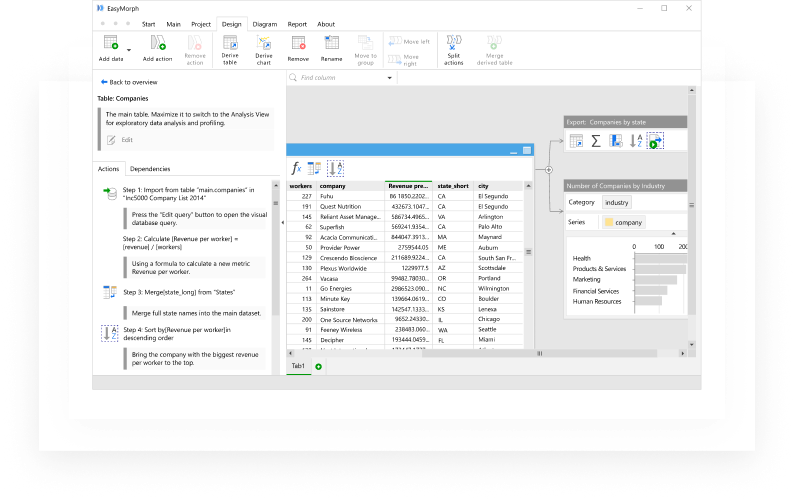
Track data changes across every step of the workflow in one clear view, with full visibility into every transformation.
Profile and analyze all columns at any point in the workflow. Work with full datasets without recalculation delays.
Schedule workflows to run on time without manual effort. Ensure data is always ready for reporting and analysis.
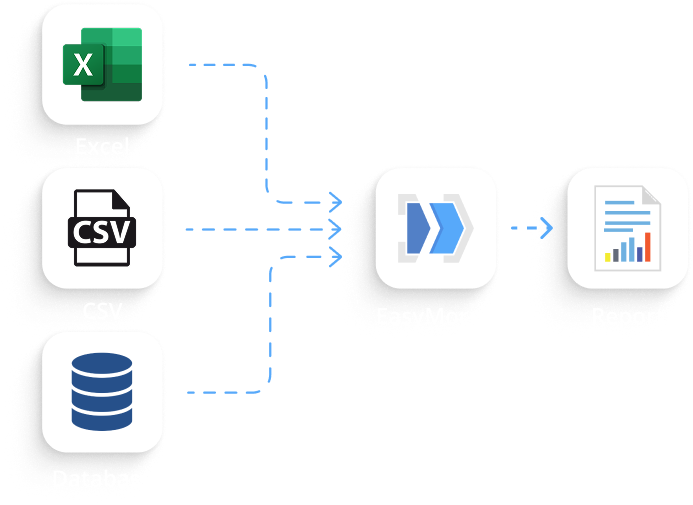
Work with spreadsheets, databases, files, cloud apps and APIs. Bring data together without complex integrations.
Replace manual data tasks with reliable automation. Reduce errors and free up time for analysis and decision-making.
Build workflows with loops, conditions and reusable logic. Adapt processes easily as requirements change.
A focused walkthrough of how teams work with data in EasyMorph
.svg)

.svg)
Financial and business calculations can be very complex and require consolidating data from many sources. Plus, calculations almost always require additional data cleansing and have to be repeated every week or every month.
Finance analysts, accountants, and investment experts use EasyMorph to:
Customer and product data is frequently spread across multiple applications and needs to be retrieved, consolidated, and analyzed on a regular basis. Therefore, marketing analysts use EasyMorph to:
Payroll and benefits calculations can be quite complex, but the source data frequently comes in a variety of forms and needs to be cleansed and prepared even before the calculations begin. Plus, due to the nature of HR data, the same calculation process has to be repeated every month or every quarter. Therefore, HR analysts use EasyMorph to:
.svg)

I found easymorph to be a great option for someonewho is comfortable using excel in a basic sense but notcomfortable creating complicated macros or usingmultiple formulas to clean data. Within 10 minutes I wasable to figure out how to use easymorph whencompiling a large amount of data from various sources.
Andrew
Easymorph is an very impressive product. It haschanged our approach to automating reports and datatransfers and massively reduced reliance on excelmacros.
Jon S.

No. EasyMorph is built for business users who work with data but don’t code. If you understand your business logic and use spreadsheets, you can use EasyMorph effectively to get answers faster.
No. EasyMorph is designed to help teams prepare, transform, and understand data — not to build or maintain dashboards. The focus is on clarity, logic, and reliable results.
IT involvement is optional. Many teams work independently, while IT typically supports data access, security, or governance when needed.
No. EasyMorph works for small teams as well as large enterprises. Teams often start with a limited scope and expand usage over time.
The demo is a practical walkthrough focused on real business scenarios. You’ll see how teams use EasyMorph to work faster with data and reduce manual effort.
Fill out the form below to get in touch with us and see EasyMorph in action.
.svg)
.svg)

